The Phomemo D30 review comes down to a practical choice: a palm-sized, Bluetooth thermal printer for quick labels, with the flexibility of several tape styles and app-based design.
It suits people organizing small items or making short-run labels, provided black-only printing and a mobile workflow fit their needs.
Phomemo D30 Review Summary
The quick verdict
4,000+ ratings
Read Amazon ReviewsPhomemo D30
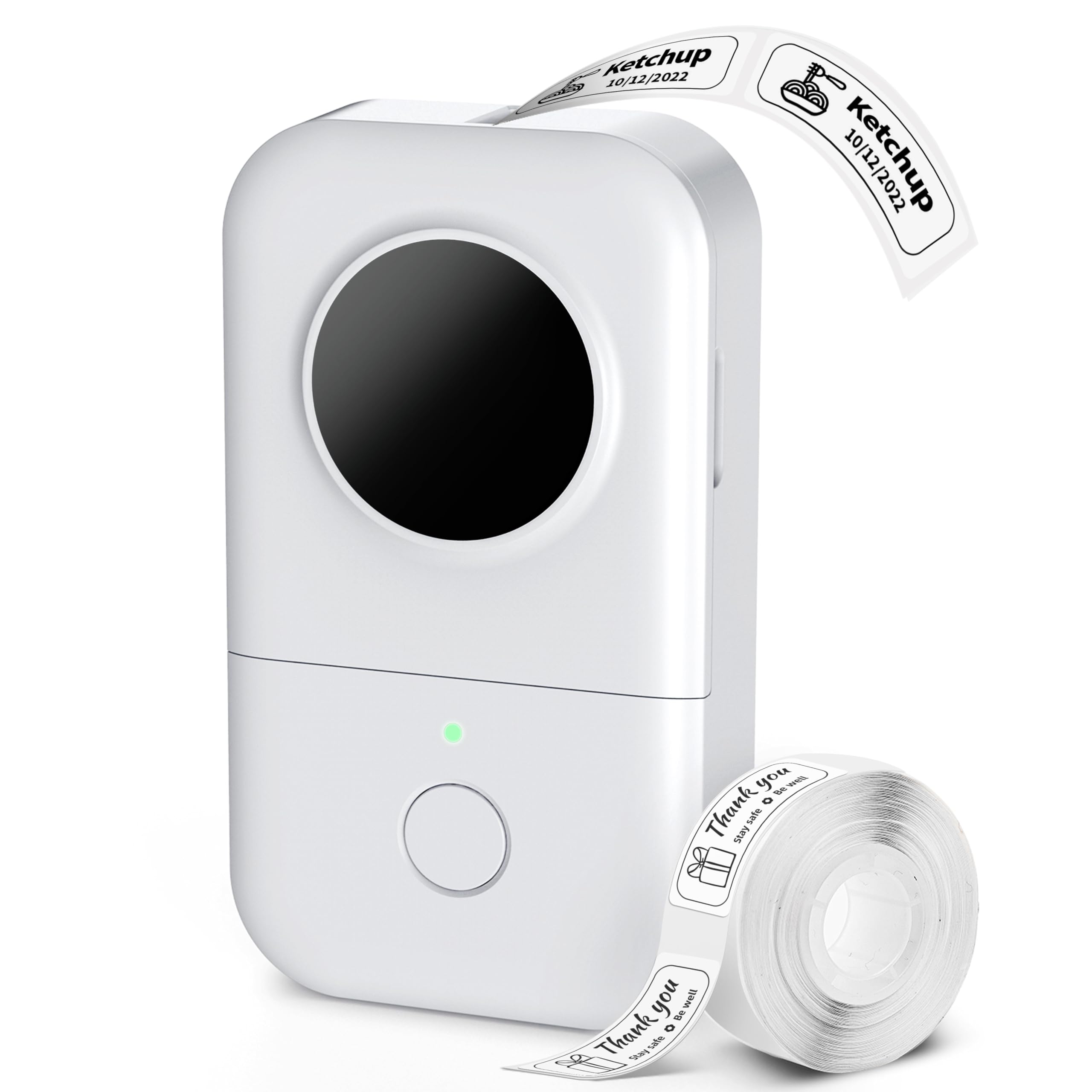
A compact, rechargeable label maker for home, classroom, and small-business users who want app-designed labels without ink cartridges.
- Palm-sized design weighing 180 g, intended for portable use.
- Monochrome thermal printing at 203 DPI, with no ink, toner, or ribbon required.
- Bluetooth 4.2 pairing with iOS and Android through the Print Master app.
- App tools include fonts, borders, icons, templates, Excel batch import, barcode and QR code generation, and OCR scanning.

Pros
- Compact and light enough to carry between home, school, and work.
- Thermal printing avoids the need for ink, toner, or ribbon supplies.
Consider before buying
- Printing is limited to black text; patterned tape changes the label appearance rather than adding ink color.
- The printer cannot print while charging, which may interrupt a longer session if the battery runs low.
Read the full review summary
The D30 combines a compact printer, rechargeable battery, and app controls for making labels without ink, toner, or ribbon.
Its supported tape range and design tools can serve everyday organization as well as small batches of classroom, inventory, or handmade-product labels.
Its strongest fit is someone who values portability and customization more than a built-in keyboard or full-color printing.
The supplied roll contains 80 pre-cut labels sized for short text, while broader label projects may call for a compatible continuous tape and some setup in the app.
The buying factors
Phomemo D30 Scorecard
Editorial scores reflect listed features and buyer fit; they are not laboratory measurements or customer ratings.
Portability
At 180 g and palm-sized, the printer is designed to travel easily between rooms or work locations.
Label customization
The app offers a wide range of fonts, borders, icons, and templates, plus barcode and QR code generation.
Tape flexibility
It supports thermal tapes from 6 mm to 15 mm, including die-cut and continuous formats.
Printing simplicity
Thermal printing avoids ink, toner, and ribbon, and Bluetooth connects the printer to iOS or Android devices.
Battery convenience
The 1,200 mAh battery is rechargeable by USB-C and supports up to two hours of continuous printing, though printing pauses during charging.
Color flexibility
Labels print with black text only; patterned tape can add color to the label background.
Key Features and Specifications of Phomemo D30
- Palm-sized design weighing 180 g, intended for portable use.
- Monochrome thermal printing at 203 DPI, with no ink, toner, or ribbon required.
- Bluetooth 4.2 pairing with iOS and Android through the Print Master app.
- App tools include fonts, borders, icons, templates, Excel batch import, barcode and QR code generation, and OCR scanning.
- Supports BPA-free thermal tapes from 6 mm to 15 mm, including waterproof, transparent, patterned, die-cut, and continuous options.
- Built-in 1,200 mAh battery charges through USB-C; the described continuous printing time is up to two hours per charge.
- Package includes the printer, USB-C cable, quick start guide, and one roll of 80 white, pre-cut 12 × 40 mm labels.
Pros and Cons of Phomemo D30
Pros
- Compact and light enough to carry between home, school, and work.
- Thermal printing avoids the need for ink, toner, or ribbon supplies.
- The app provides substantial design flexibility, from simple text to codes and batch imports.
- A useful range of tape widths and finishes supports different labeling tasks.
Consider before buying
- Printing is limited to black text; patterned tape changes the label appearance rather than adding ink color.
- The printer cannot print while charging, which may interrupt a longer session if the battery runs low.
- The included pre-cut labels are relatively small and are described as best for one to three words.
- Label creation depends on a Bluetooth-connected phone or tablet and the companion app.
Who Should Buy Phomemo D30?
Good fit
Consider the D30 if you want a portable way to label pantry containers, cables, files, plant pots, or other small items.
Its thermal system and app controls bring the basic workflow together without the space and consumables associated with a conventional ink printer.
It can also suit teachers, makers, and small sellers who need short labels, name tags, or price tags in different styles.
Before settling on it, check that the black-only output and supported 6–15 mm tape widths match the appearance and dimensions you need.
For occasional labeling, the supplied roll gives you a starting point. If you expect to print batches or longer labels, consider whether continuous tape and the app's batch-import tools fit your process.
Who should skip it
Look elsewhere if your work requires colored text, image-rich graphics, or labels wider than 15 mm. The D30 prints black text, with patterned tape providing the color effect.
It may be a poor match if you need a standalone labeler with physical controls or must keep printing while the unit charges. Its design centers on app-based Bluetooth use and battery-powered sessions.
How the Phomemo D30 Fits Everyday Labeling
Small form, focused jobs
The D30's low weight and palm-sized design make it easy to keep near a desk or pack for a classroom or market booth.
That portability is most useful for small, frequent tasks; the included 12 × 40 mm labels are aimed at brief wording rather than long descriptions.
Thermal output and tape choice
Thermal printing means there is no ink, toner, or ribbon to replace.
The printer produces black text, while the tape selection changes the label's finish or background; check the tape width and format against the surface and amount of text you plan to label.
A phone-centered design process
Bluetooth pairing and the Print Master app provide the editing tools, from templates and icons to barcodes, QR codes, and batch import.
This approach offers more design options than a minimal label workflow, but it assumes you are comfortable creating and sending jobs from a mobile device.
Battery rhythm
The rechargeable battery is described as supporting up to two hours of continuous printing, with USB-C charging taking about two to three hours.
Since printing is unavailable while charging, planning a larger batch around the available charge can help avoid a pause.
Alternatives to Phomemo D30
No alternative model is recommended here. Compare the design and features that matter to your routine before choosing another option.
Is Phomemo D30 Worth It?
The Phomemo D30 is worth considering for compact, app-designed black-on-thermal labels at home, school, or a small business.
Its portability, tape choices, and range of design tools make it a flexible fit for everyday organization and short labeling runs.
Choose it if the mobile workflow and black-only output suit you, and check tape width and battery timing before larger projects.
If you need color printing, a wider label format, or printing during charging, its described design may not fit your routine.
Your review at a glance
4,000+ ratings
Read Amazon ReviewsPhomemo D30
A compact, rechargeable label maker for home, classroom, and small-business users who want app-designed labels without ink cartridges.
- Palm-sized design weighing 180 g, intended for portable use.
- Monochrome thermal printing at 203 DPI, with no ink, toner, or ribbon required.
- Bluetooth 4.2 pairing with iOS and Android through the Print Master app.
- App tools include fonts, borders, icons, templates, Excel batch import, barcode and QR code generation, and OCR scanning.